SEARCH
Enter keywords, product name, or question
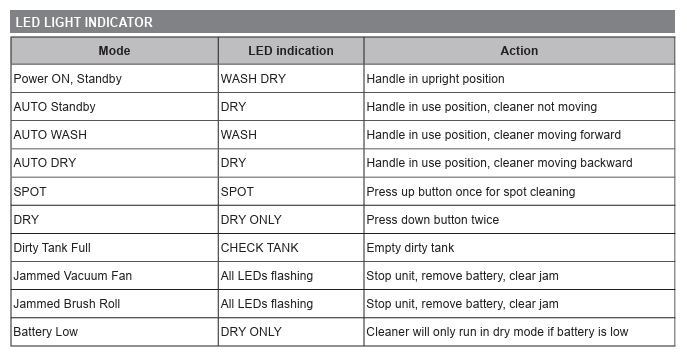
All LEDs flashing can indicate either a jammed vacuum fan or a jammed brush roll. Stop the unit, remove the battery, and clear the jam before using it again.
This should always be done with the battery removed for safety.
Clean the brush roll
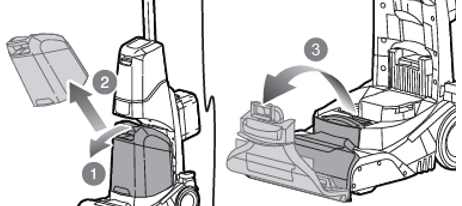
- To remove the brush roll, first ensure that the dirty water tank is removed.
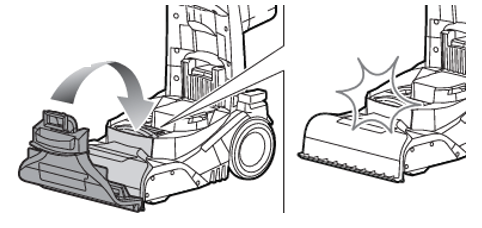
- Then pull up on the back of the floor head cover, to remove it.
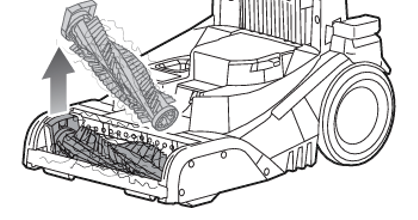
- Pull out the Brush roll by pulling on the left hand side of the Brush roll.
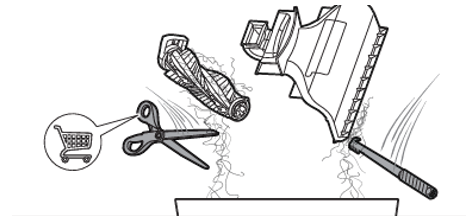
- Remove any hair by cutting it off carefully, and using the cleanout tool to remove any dirt build up in the cover and/or the brush.
- When completely dry; reinsert the brush, by first slotting in the right hand side, then clipping in the left.
- While the brush is removed, check if there are any obstructions that would interfere with suction.
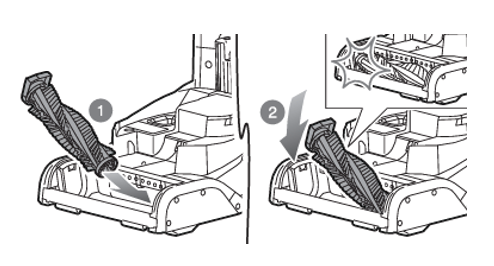
- Then clip the brush cover back into position by lining up the front of the cover with the unit and the clipping in position.
RCW18X