SEARCH
Enter keywords, product name, or question
If your RYOBI Nailer or Stapler has a jammed nail or staple, follow these steps to clear it safely:
Safety First
- Remove the battery from the tool before doing any adjustments to the tool
- Unload the magazine
- remove any nails or staples that aren’t jammed. This relieves pressure on the jammed fastener.
- Open the jam release
- pull up on the latch located at the nose of the tool.
- Free the firing pin
- insert a flat-blade screwdriver into the driving mechanism and gently pushing the firing pin back. This should expose the jammed nail or staple.
- Remove the jammed fastener
- use a pair of pointed nose pliers if needed.
- Close the jam release and latch securely.
- Reload the magazine with nails or staples.
What causes nails or staples to jam?
- Using the incorrect size, type, or angle of nails or staples can lead to jams.
- Always ensure you're using the correct gauge of fasteners for your tool.
- Confirm that the collation angle of the nails or staples matches the specifications of your Nailer or Stapler magazine.
○ You can find this information on the ratings plate of your tool — see example below:
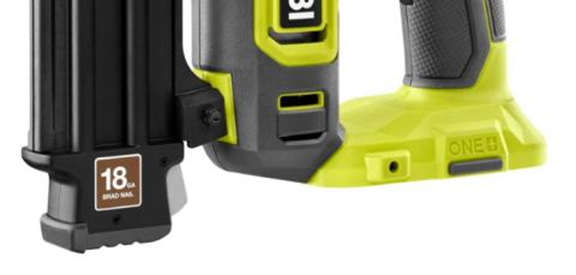
If using a Nailer, check that the nails or are straight and in good condition with no corrosion.
Check that the magazine of your Brad Nailer or Stapler is clean and dry with no sticky residue - we recommend you do this more frequently with regular use of the tool.
R18GN18, R18NL15-0, R18NL16-0, R18ST-0, R18NL-0, R16GN18, R18GS18